
To support your negotiations in the Vuulr platform - and our communications with you - we ask for your email and cell/mobile phone number during your initial account registration process.
Both email and SMS act as optional Notification channels which we validate both during registration so you may see messages relating to them if we can't verify these details (check Spam if you don't see anything in your inbox).
Neither are revealed to another party unless you have succesfully concluded a transaction with them, at which point they are revealed in the Deal Memo so that you can liase about critical next steps such as delivery and billing.
Customization
You can customize your settings to receive or stop notifications - via email, SMS or both - at any time. Navigate to your profile (top right corner), then select Notifications & Subscriptions, and then choose how you wish to receive alerts from the marketplace.
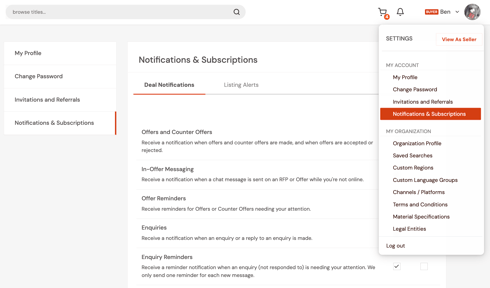
You may deselect everything: the minimum we need a mobile number for is as a backup for the Vuulr team in an ‘emergency’ (eg you might have missed a red hot offer and we would like to prompt you!).