
Once submitted, your Brief will be seen by Sellers right away *. Simply navigate back to the left menu to find and manage all the Buyer Briefs you have created.
1. The status indicates at which stage the Brief is:
- Pending: the Brief is currently pending Vuulr Admin review
- Open: the Brief is already published to all our Sellers
- Closed: the Brief has reached the expiry stated by you, or you may have chosen to end the Brief earlier
2. You can also see the number of responses you have received from Sellers for each Brief. If there are new responses, simply click to view them. Whenever there is a new response, you will be notified via Email, or via the notifications in the top right corner of the platform (the bell).
3. You can create multiple Briefs to manage content requests separately.
*In some cases, a Brief will be held and reviewed by the Vuulr team. When that happens, we will send an email to notify you once the Brief is approved and published.
How to Edit or Close a Brief?
Simply navigate to the bottom of the Brief and you can find the buttons to Edit or Close it. Editing an approved and "Open" brief might set it to "Pending" status for the Vuulr Admin review, this means the Seller will temporarily not be able to see it until the Admin have approved it.
Viewing Seller Responses and what to do next?
When Sellers respond, you will be notified via Email. Or you can navigate to the Brief in the "Buyer Briefs page". There might be responses with listings that are not exact matches to your Content of Interest. If you wish to view responses which are only exact matches, click on the checkbox to narrow down the responses.
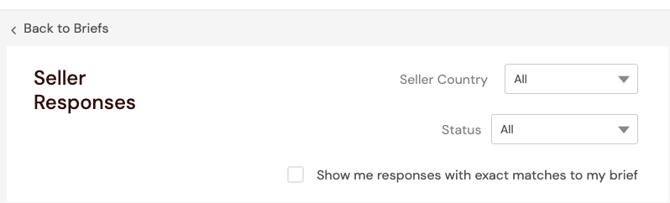
Click into each response to view its details. When you hover on a Listing poster, you can see the actions you can take from here:
1. Bundled Deal: Add this listing to your Cart to package it into a Bundle and potentially negotiate for a better price with the Seller
2. Make Offer: Make a direct Offer/RFP for the selected single listing
3. Save to Watchlist: Save this listing into a Watchlist first, which then can be converted into an Offer if you choose
4. View the Listing quick details.
In the right panel, you can also view the entire catalog of the Seller, or chat with them to ask questions. If you don’t like the response, please Decline the deal so that the Seller isn’t left hanging! ;)